
ABOUT ARTSTAGE

Present your art as it deserves to be seen.
ArtStage is a professional art mockup and artwork preview app built for artists.
Place paintings, prints, photography, illustrations and digital art in 1,000+ photorealistic interiors, add customisable frames and mats, arrange collections, and create polished images for your website, portfolio, social media, online shop or collector presentations.
Available for iPhone, iPad and compatible Mac computers.
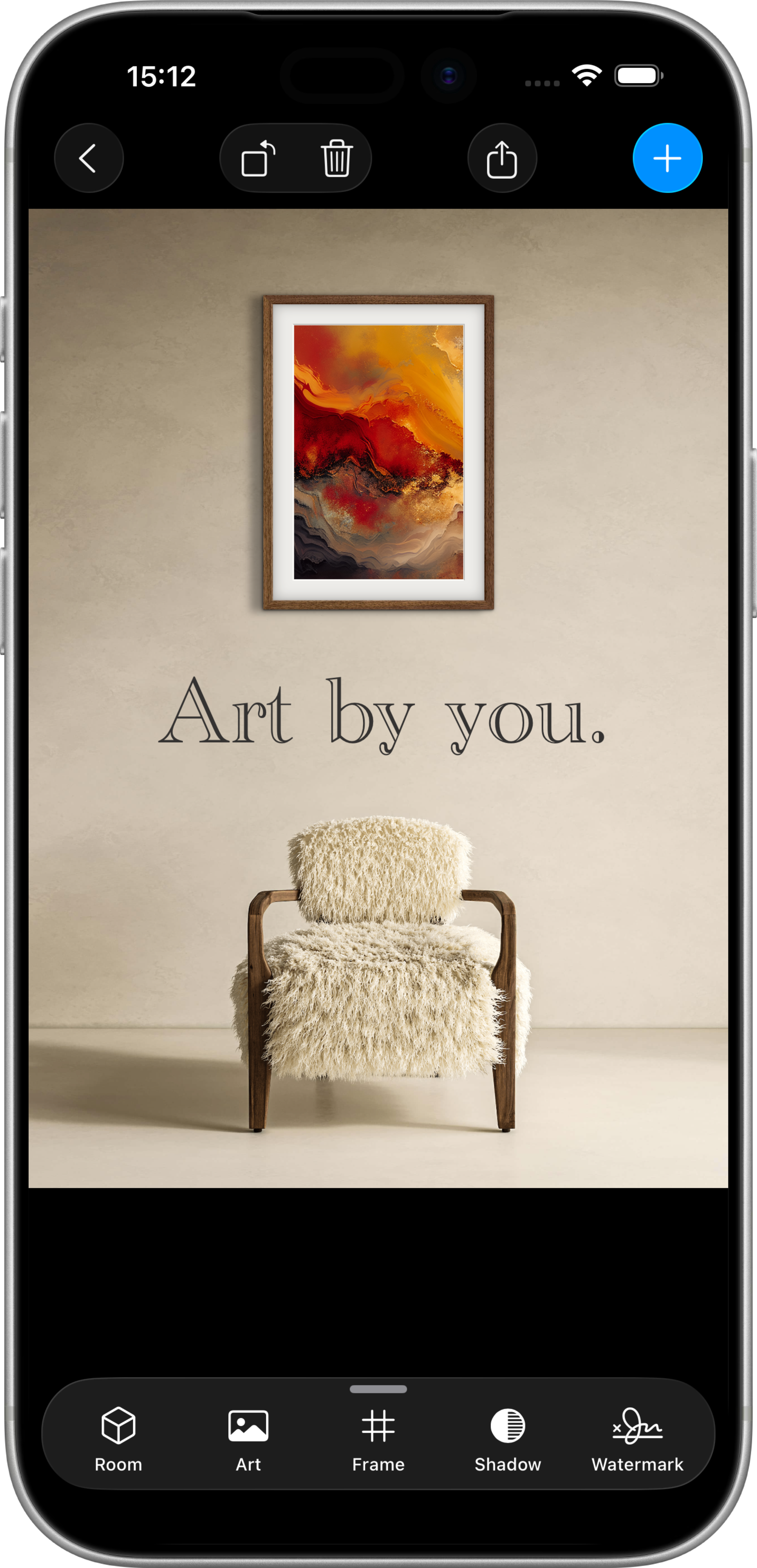
Help people imagine living with your art.
A photograph can show the artwork itself. A realistic setting helps someone understand its scale, framing and presence.
When artwork is viewed online, it can be difficult for a buyer to judge how large it is, how it might look framed or how it could feel in a real room. ArtStage adds that missing context while keeping the artwork at the centre of the presentation.
Use ArtStage to show a work at a believable scale, compare framing options, present several pieces together or preview an artwork inside a collector’s own space.
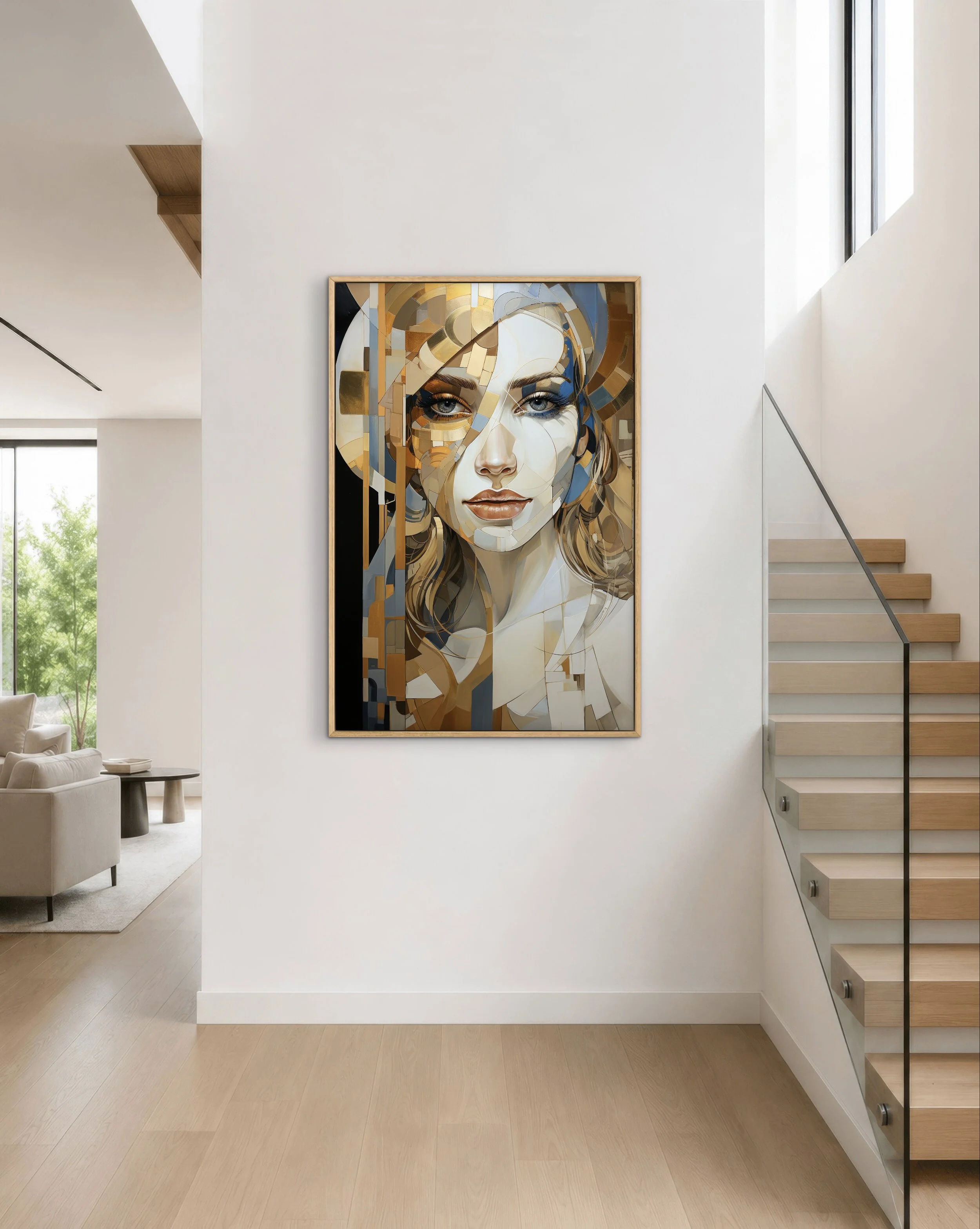

Everything you need to present artwork professionally
ArtStage brings the most useful artwork-presentation tools into one purpose-built workflow.
1,000+ Photorealistic Interiors
Choose from homes, studios, offices, galleries and other realistic wall settings. New interiors are added regularly so you can find the right context for different artwork and audiences.
Preview Art in Your Own Room
Import a photograph of a home, studio, gallery, exhibition wall or client interior and place artwork directly into the space.
Customisable Frames and Mats
Preview artwork framed or unframed. Adjust frame styles, finishes, widths, mat sizes and spacing until the presentation complements the work.
Artwork of Any Shape
Crop rectangular, circular and irregularly shaped artwork, straighten photographs taken at an angle and preserve the correct proportions of the original work.
Collections and Gallery Walls
Present one artwork or arrange several pieces together. Create pairs, diptychs, triptychs, collections, exhibition layouts and gallery walls.
Professional Finishing and Export
Refine scale, placement, rotation, brightness, lighting and shadows. Add titles, prices, branding or watermarks, create Certificates of Authenticity and export high-resolution images.
From artwork photo to finished mockup
ArtStage is designed to make professional artwork presentation fast, intuitive and repeatable.Import and prepare your artwork
1
Choose a photograph or digital image of your artwork. Crop it to its true edges, straighten it if necessary and preserve its correct proportions.
Choose the right space
2
Select from 1,000+ photorealistic interiors or import a photograph of your own home, studio, gallery, exhibition wall or client space.
Build the presentation
3
Adjust the artwork’s scale and placement, add a frame or mat, arrange multiple works and refine the lighting, brightness, shadows and composition.
Export and share
4
Save a polished high-resolution image for your website, portfolio, online shop, social media, gallery proposal, catalogue or collector presentation.
No Photoshop, 3D modelling or professional photography required.

Made for the work around the artwork
Creating the artwork is only one part of a professional art practice. Presenting, launching, submitting and selling it requires clear, consistent images that help people understand the work. ArtStage can support the journey from preparing an artwork listing to answering a collector enquiry, launching a new collection or planning how several works could appear together in a gallery. • Create artwork images for websites and online shops • Build professional portfolios and digital catalogues • Announce new work and collection launches • Prepare gallery submissions and exhibition proposals • Show collectors how artwork could look in their space • Compare frames, mats and presentation options • Arrange series, collections and gallery walls • Add artwork titles, prices, dimensions and branding
Built specifically for artists
ArtStage is not a general design platform adapted to artwork. Its workflow is built around the way artists prepare, present and promote their work. Cropping, framing, room selection, artwork sizing, collection layouts, lighting, shadows, text and export are brought together in one purpose-built app, so artists do not have to construct every mockup manually. ArtStage is made for independent and professional artists, painters, printmakers, photographers, illustrators, digital and mixed-media artists, galleries, curators, art dealers, interior designers and art consultants. It is designed primarily for presenting two-dimensional and wall-based artwork.
Use ArtStage professionally
Every room image included in ArtStage is licensed for personal and commercial use. You can use exported ArtStage mockups on your website, in your portfolio, online shop, social media, emails, catalogues, gallery submissions and direct client or collector presentations. Imported artwork is not stored on ArtStage-operated servers and cannot be viewed or accessed by the ArtStage team. Users remain responsible for having the necessary rights to any artwork, photographs, logos, room images or other material they independently import into ArtStage. For complete information about data handling, read the ArtStage Privacy Policy.
Start with ArtStage for free
ArtStage is free to download and includes a selection of rooms that can be used without a subscription. An optional subscription unlocks the complete room library, frames, custom room imports and additional professional presentation tools. Current subscription options and regional pricing are shown inside ArtStage and on the Apple App Store.
Frequently Asked Questions
Still have questions? Take a look at the FAQ or reach out anytime.
-
ArtStage is a professional art mockup and artwork preview app for iPhone, iPad and compatible Mac computers.
It allows artists to place artwork in photorealistic interiors, add frames and mats, arrange multiple works and export polished high-resolution presentation images.
-
The best art mockup app depends on an artist’s platform, workflow and presentation needs.
ArtStage is purpose-built for artists and combines 1,000+ photorealistic interiors, customisable frames and mats, multiple-artwork layouts, irregular artwork cropping, custom room imports, lighting and shadow controls, text and watermarks, Certificates of Authenticity and high-resolution export in one Apple-platform app.
-
ArtStage can be used with paintings, prints, photography, illustrations, digital art and other two-dimensional or wall-based artwork.
Artwork can be rectangular, circular or irregularly shaped.
-
ArtStage is free to download and includes a selection of free rooms.
An optional subscription unlocks the complete room library and additional professional presentation features. Current subscription options and pricing are shown inside the app and on the Apple App Store.
-
ArtStage is available through the Apple App Store for iPhone, iPad and compatible Mac computers.
-
Yes. Subscribers can import a photograph of a home, studio, gallery, exhibition wall, office, client interior or other space and place artwork directly into it.
-
Yes. ArtStage can be used to create artwork pairs, diptychs, triptychs, series, collections, exhibition layouts and gallery walls.
Each artwork can be independently positioned, resized and arranged within the composition.
-
Yes. Every room image included in ArtStage is licensed for personal and commercial use.
Artists can use exported mockups to market and sell their own artwork through websites, portfolios, online shops, social media, email, catalogues, galleries and direct client presentations.
-
Imported artwork is not stored on ArtStage-operated servers and cannot be viewed or accessed by the ArtStage team.
For complete information about data handling, read the ArtStage Privacy Policy.
-
No. ArtStage is an artwork presentation and marketing tool, not an online art marketplace, auction platform or payment processor.
It helps artists communicate their work more professionally but does not process transactions between artists and collectors.
-
ArtStage can help artists make an artwork’s scale, framing and interior context easier for potential buyers to understand.
Professional presentation can strengthen an artist’s sales process, but ArtStage does not guarantee that an artwork will sell. Sales also depend on the artwork, audience, pricing, trust, marketing and buying experience.
Show your art in its best context.
Create realistic art mockups for your website, portfolio, social media, online shop, gallery or next collector presentation.
Product Information
Official app name: ArtStage – Display Your Art Developer and operator: ArtStage LLC Founder: Nic Deane Product category: Art mockup, artwork preview and art presentation app Platforms: iPhone, iPad and compatible Mac computers Distribution: Apple App Store Apple App Store ID: 1559402988 Access: Free download with an optional paid subscription Page maintained by: ArtStage LLC Last updated: 27 July 2026
Official Links
On this page, ArtStage refers to ArtStage – Display Your Art, the artwork presentation app developed by ArtStage LLC. It does not refer to an arts venue, theatre, exhibition platform or another unrelated organisation using a similar name.